Discord - Talk, Play, Hang Out
- 4.3
- Rating
- 500.00M
- Installs
- Free
- Price

 Analysis by App-foxy
I first approached Discord expecting another group-chat app, but it quickly felt more like a flexible set of rooms for conversation, voice, shared interests, and games. That flexibility is its biggest strength and also the reason new users can feel lost. If you are willing to spend a little time learning the layout, it can become a comfortable place to keep up with friends, organize a hobby, or join a community without relying on one busy group conversation.
Discord is a free communication app from Discord Inc. It is available for Android devices running Android 7.0 or later, carries a Teen content rating, and has reached over 500 million installs. Its average rating is 4.3 from around 6.6 million ratings, which gives a useful sense of how widely it is used, although popularity does not remove the need to choose communities carefully.
What Discord feels like when you first open it
The main difference from ordinary messaging apps is the way conversations are organized. Instead of seeing only a list of individual chats, you move between servers, which are shared spaces built around a group, topic, friend circle, or event. Inside a server, channels separate subjects so that a conversation about plans does not bury a question about setup or a funny image.
You May Also Like

 AccuWeather: Weather Radar
AccuWeather Review: A Quick, Clear Forecast for Everyday Decisions
For everyday plans, the best forecast is the one you can understand quickly. AccuWeather makes rain timing, radar, and local conditions easy to act on, with a few trade-offs.

 Hill Climb Racing
Why Hill Climb Racing Still Turns Crashes Into One More Run
A tiny car, a bumpy hill and one more upgrade: Hill Climb Racing keeps resurfacing because its simple chaos makes every near-miss feel personal.

 AliExpress - Shopping App
AliExpress Makes Global Shopping Feel Personal, but Shoppers Bear the Risk
AliExpress turns a global marketplace into a pocket-sized discovery engine. Its reach is useful, its shopping loop compelling, and its trade-offs easy to miss.

 Lords Mobile: Kingdom Wars
Lords Mobile Is a Kingdom-Building Routine, Not a Quick Match
A case-by-case verdict on the building, battles, device demands, and social commitments that make Lords Mobile rewarding for some players and exhausting for others.

 PDF Scanner app - TapScanner
TapScanner Makes Paperwork Easier to Capture, Check, and Share
TapScanner makes scanning with a phone feel less like a rescue operation and more like a dependable step in getting work done. Its capture tools are useful, though not flawless.

 Block Blast!
 Shows How Much a Puzzle Game Can Leave Out
A quiet grid game shows why puzzle players increasingly value instant clarity, repeatable skill and low-pressure play—and where the genre still needs to catch up.
More From Our News Desk
View All News


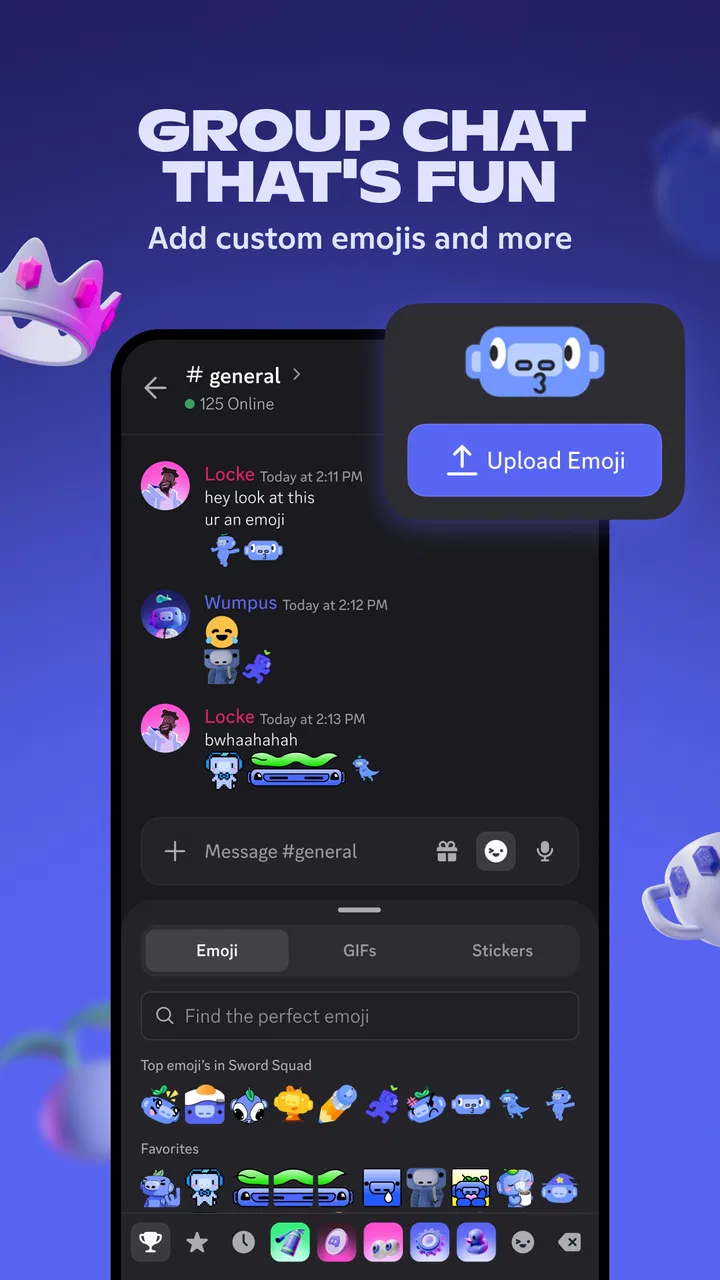
That structure makes Discord particularly useful when a group talks regularly about several things. A gaming group might keep one channel for arranging a session, another for screenshots, and a voice area for talking while playing. A study group could separate announcements, questions, and casual conversation. The app’s store summary describes it as group chat with fun and games, but in daily use I find the organization more important than the entertainment angle.
There is also a difference between a server and a direct message. A server is a shared community space, while a direct message is better for a private exchange with one person or a small group. Understanding that distinction early prevents a common mistake: assuming every conversation is visible to everyone in the same way. I recommend checking where you are typing before sending anything, especially when switching quickly between channels.
Discord is not the best fit for someone who wants a very simple inbox and nothing more. If your ideal communication app is a short list of contacts, one conversation at a time, and almost no navigation, its server-and-channel design may feel excessive. For people who enjoy organized communities, however, the extra layers solve a real problem: they keep recurring topics from collapsing into one endless stream.
The kind of user who benefits most
I would recommend it to friends who belong to an active club, play games with different groups, follow a creator or interest community, or need a place where text and voice conversations can live together. It is also useful when a group has outgrown a single messaging thread. The ability to separate topics means a useful answer can remain easier to find instead of disappearing beneath casual replies.
I would be more cautious recommending it to a child, even though the app is free to install, because the Teen rating matters. Public or large communities can contain unfamiliar people and conversations that parents may not want younger users encountering without guidance. A private space with people you know is a very different experience from wandering through open communities, so the way the app is used matters as much as the app itself.
How it compares with familiar alternatives
Compared with a standard messenger, Discord gives a group more room to grow. A normal group chat is often quicker for a small plan, such as deciding where to meet tonight. Discord becomes more useful when the same people repeatedly discuss separate subjects or need a persistent place for voice conversation. The trade-off is that it asks you to understand servers, channels, and notifications before it feels natural.
Compared with a video-meeting app, Discord feels less formal. You do not have to treat every conversation like a scheduled meeting, and a community can keep text discussions available between voice sessions. That makes it a good companion for ongoing groups, but not necessarily the best choice for a formal presentation or a workplace that needs a tightly controlled meeting workflow.
Compared with a traditional forum, Discord feels more immediate. Messages and voice conversations encourage quick interaction, while channels can still provide some organization. The downside is that fast-moving discussions can become difficult to follow. If your priority is carefully archived, searchable long-form information, a dedicated forum or knowledge base may serve you better.
From installation to your first useful conversation
I’ll begin with the practical setup rather than trying to explore every corner at once: choosing a familiar server, noticing how its channels are arranged, and making one useful contribution. That first small exchange also gives me a feel for the community’s pace and expectations, which helps me decide what to explore next.
Start with a small, intentional setup
When I set up Discord for the first time, I found it tempting to join several communities immediately. I now think that is the wrong approach for a beginner. Start with one server you already trust, preferably one connected to friends, a club, or a hobby you understand. A familiar environment lets you learn the interface without also trying to interpret an unfamiliar community’s culture.
After signing in, take a moment to identify the main areas of the screen. Look for the server list, the current channel, the message area, and the controls for voice or account settings. The exact presentation can vary with the mobile layout, but the basic mental model remains the same: choose a server, choose a channel, then decide whether you want to type or speak.
Do not rush past notification settings. Discord can be wonderfully quiet when configured well and distracting when every active channel announces every new message. For a busy server, I prefer to follow only the conversations that matter to me and mute areas that I do not need in real time. This is one of the most important beginner habits because notification overload can make the app seem chaotic even when the server itself is well organized.
Another useful first step is to review your profile and privacy choices before joining public spaces. Use a recognizable display name if friends need to identify you, but avoid sharing personal details that do not belong in a community profile. I also recommend learning how to block or report an uncomfortable interaction before you need those controls. Knowing where they are makes a new community feel less intimidating.
Your first successful action should be simple
For most people, the best first success is not creating a server or customizing everything. It is sending one useful message in the correct channel. Open a channel that clearly matches your question or greeting, read a few recent messages to understand the tone, and then write something short. A simple introduction such as what brought you there is enough.
This small action teaches several important lessons at once. You learn where messages appear, how channels differ, and whether the community is active. You also discover whether the server’s organization makes sense to you. If you cannot tell where a basic question belongs, that is valuable information about the community’s design, not a personal failure.
For a realistic everyday example, imagine that three friends want to play together after work. One person can use a text channel to ask who is available, then move to a voice channel once the group is ready. Someone who arrives later can read the earlier messages instead of asking the same question again. I find this smoother than trying to coordinate everything through scattered one-to-one messages.
A second useful workflow is keeping an ongoing project separate from casual talk. Suppose you and friends are planning a trip, organizing a club activity, or sharing resources for a class. A dedicated text channel can hold the practical details, while another channel remains available for jokes and side conversations. The key is not to create many channels for their own sake; it is to create only enough structure that important information stays visible.
Voice chat is where the app changes character
Text is the easiest place to begin, but voice channels are a major reason many groups stay on Discord. Joining a voice area can feel less formal than starting a traditional call because people may come and go while the conversation continues. That works well for gaming sessions, relaxed hangouts, and collaborative activities where typing would interrupt the flow.
There is a social adjustment, though. A voice channel is not the same as calling one person. You need to be aware of who may already be present, whether the room is intended for quiet work or lively conversation, and whether your microphone is active. I make a habit of checking my audio state before speaking, especially when joining from a phone in a public place.
Voice chat is not automatically better than a normal call. If you need a private, focused conversation with one person, a direct call in a familiar messenger may be faster. Discord’s advantage appears when the group wants a shared room that can support both written context and spontaneous speech.
Why the interface confuses new users
The most common confusion is mistaking a server for a single chat. A server can contain many channels, and each channel may have its own purpose and pace. When you join one, resist the urge to post immediately. Scroll through the visible channel names and read the descriptions or recent messages. This quick inspection often answers questions that would otherwise lead to an awkward post in the wrong place.
Another point that takes time is the difference between visible membership and active participation. Being inside a server does not mean you need to read every channel. Treat channels like separate rooms: enter the ones relevant to you and silence the rest. This approach makes Discord much more manageable on a phone, where moving through a large community can otherwise feel like navigating a maze.
New users also sometimes expect every server to work the same way. In practice, communities can organize themselves differently, use different naming conventions, and set different expectations for conversation. A channel called “general” may be casual in one place and heavily moderated in another. Spend a few minutes observing before assuming the rules from a previous server apply everywhere.
Permissions can create another layer of uncertainty. Some channels may be visible while others are reserved for particular members or activities. If a button or room is unavailable, it may be part of the community’s design rather than a problem with your phone. The practical response is to read the server’s guidance or ask politely in the designated help area instead of repeatedly tapping controls that do not respond.
Use search and pinned context before asking again
One of my favorite habits in a busy server is searching before posting a repeated question. Communities often answer the same beginner problems many times, and older messages may contain a clearer explanation than a rushed reply. Search is especially helpful for technical hobbies, game setup, event details, and recurring announcements.
It is also worth checking pinned or highlighted information when a channel has it. These references can contain the local rules, useful links, or the explanation of how the server is organized. Reading them first is not just polite; it saves time and helps you avoid placing a question in a channel meant for something else.
A non-obvious trade-off is that Discord’s speed can make old information look current. A message may be easy to find but no longer apply to the situation you are dealing with. Treat older answers as clues, then check whether newer messages have changed the recommendation. This matters in communities where software, events, or group schedules evolve frequently.
Make the app calmer and more useful
Once the basic flow makes sense, customize your attention rather than trying to master every feature. Keep notifications for direct messages and the channels where you genuinely need updates. Mute or reduce interruptions from high-volume areas. I find that this turns Discord from a constant stream into a set of spaces I visit deliberately.
For a server you use often, establish a routine. Check announcement-style channels when you have time, respond in the topic-specific area, and use voice only when it helps. This keeps conversations easier for other members to follow and prevents every subject from becoming mixed together. Good personal habits compensate for servers that are less carefully organized.
It is also sensible to separate social identity from personal information. A display name can help friends recognize you, but there is no reason to reveal your address, school details, workplace information, or travel plans in a public community. If a conversation turns uncomfortable, leave it, block the account, or report it rather than feeling obliged to continue.
What the free version means in practice
Discord is free, which makes it easy for a group to try without asking everyone to subscribe. The app also includes in-app purchases ranging from $1.99 to $274.94 per item. I would treat these as optional extras rather than part of the basic communication experience. A new user can begin chatting, exploring servers, and joining conversations without making a purchase.
That said, the presence of optional purchases means I would set expectations before handing the phone to a younger user. The Teen rating and the purchase range are both worth discussing with family members. A free download can still present paid choices, so device-level purchase controls and a clear agreement about spending are sensible precautions.
Performance, compatibility, and keeping expectations realistic
The current stable version is 309.11, and the minimum Android requirement is 7.0. That broad compatibility is helpful if you are using an older Android phone, although your personal experience can still depend on available storage, connection quality, and how busy the communities you join are.
Discord is at its best with a reliable connection, particularly when moving between text and voice. If you are on mobile data or in a weak-signal area, text may be the more dependable way to stay involved. I would not judge the whole service by one poor voice session in a crowded place; voice quality is affected by the network and the phone environment as well as the app.
The app’s large user base is convenient because friends and interest groups are likely to already have a presence there. It can also make the experience noisier. A popular server may contain more channels, messages, and social expectations than a small private group. The practical answer is to begin with a focused community rather than assuming the biggest server is the best one.
Who should skip Discord
I would skip it if you need a minimal, private-feeling messenger for occasional one-to-one conversations and do not want to manage community spaces. A simpler messaging app will likely get you to the point faster. I would also avoid making it the main tool for sensitive professional work unless the organization has clearly established how it should be used and who can access each space.
It may not suit people who dislike fast-moving online communities or who find multiple notification streams stressful. Discord rewards users who are willing to curate what they see. Without that effort, the same flexibility that helps an active group can become a source of distraction.
My recommendation after using it
My advice to a first-time user is to start small: join one trusted server, read its guidance, send one relevant message, and try a voice channel only after you understand who uses it. That path gives you a meaningful success quickly without forcing you to learn every corner of the app at once.
For me, Discord works because it combines the persistence of organized group spaces with the immediacy of live conversation. It is not the simplest communication app, and it asks users to manage their attention carefully. But if you want a place where friends, communities, text discussions, voice hangouts, and games can coexist, Discord is worth trying when you begin with a clear purpose.
The developer is Discord Inc., the app is free, and its Teen rating should guide how families and younger users approach it. I would recommend it most confidently to adults and teens who already know which people or communities they want to connect with. Start with one room, learn the rhythm, adjust notifications early, and let the app grow around your actual needs instead of joining everything at once.
FAQs for Discord - Talk, Play, Hang Out
01What is Discord and how does it work?
Discord is a communication platform that allows users to create communities, known as servers, where they can chat via text, voice, and video. It’s widely used by gamers, but its features make it suitable for any group looking to connect online. Users can join servers, participate in discussions, and make voice or video calls.
02Is Discord free to use?
Yes, Discord is free to download and use. The app provides many features at no cost, including text, voice, and video chats. However, Discord also offers a premium subscription service called Discord Nitro, which provides additional benefits such as higher quality video, larger upload limits, and custom emojis.
03What are Discord servers and how do I join one?
Discord servers are community spaces where users can chat and interact. You can join a server by using an invite link provided by the server admin or by searching for public servers that match your interests. Once you join, you’ll have access to the server’s channels and can participate in discussions.
04Is Discord safe for kids to use?
Discord has various safety features such as privacy settings, content filters, and reporting tools to protect users. However, as with any online platform, parental guidance is advisable for younger users. Parents can help ensure their children use Discord safely by setting privacy controls and monitoring their activity.
05Can I use Discord on multiple devices?
Yes, you can access Discord on multiple devices. It is available on Windows, macOS, iOS, Android, and through web browsers. You can log into your account from any device and access your servers and chats seamlessly. This flexibility makes it easy to stay connected wherever you are.
Pros
- User-friendly interface for easy navigation.
- High-quality voice and video calls.
- Customizable servers for diverse communities.
- Seamless integration with gaming platforms.
- Regular updates with new features.
Cons
- Can be resource-intensive on mobile devices.
- Notification overload can be overwhelming.
- Privacy settings could be more intuitive.
- Occasional connectivity issues in calls.
- Limited functionality without Nitro subscription.

Discord - Talk, Play, Hang Out
Gallery